

This guide walks through integrating the Auth0 Dart Auth SDK to add secure, production-ready authentication to your Dart application.
🎥 Prefer video? A short YouTube walkthrough is included below.
https://youtu.be/HFlKRiaKDEg
Authentication is a critical component of any modern application, ensuring that only authorized users can access protected features and data. Implementing secure authentication from scratch can be complex and time-consuming, especially when dealing with token management, password security, and identity best practices.
With Auth0 integrated into Flutter using the auth0_dart_auth_sdk, developers can effortlessly implement a robust, industry-standard authentication system. Auth0 provides secure identity management, seamless login flows, and support for multiple authentication methods. This allows developers to focus more on building great user experiences while relying on Auth0 for secure and scalable authentication.
Table of Contents
- Prerequisites
- Auth0 Dashboard Setup
- Flutter Project Setup
- Project Structure
- Setting Up Environment Variables
- Implementation
- Testing Auth0 Dart Auth SDK in Flutter App
- Conclusion
Prerequisites
Before starting, ensure you have:
- Install Flutter and Dart SDKs on your local machine. Use the command below to confirm each SDK is installed.
dart --version
flutter --version
-
You have a basic knowledge of Dart programming language.
-
Auth0 Account
Auth0 Dashboard Setup
Step 1: Create an Auth0 Account
- Go to https://auth0.com
- Click Sign Up and create your account
- Complete the onboarding process
Step 2: Create an Application
- Navigate to Applications → Applications in the left sidebar
- Click Create Application
- Enter an application name (e.g., "Flutter Mobile App" or "My App")
- Select Native as the application type
- Click Create
Step 4: Configure Application Settings
- Go to the Settings tab of your newly created application
- Note down the following (you'll need these later):
- Domain (e.g., dev-dah.us.auth0.com)
- Client ID (e.g., abc123xyz456)
- Scroll down to Application URIs section:
- Allowed Callback URLs: Add your app's callback URL
com.example.myapp://auth0callback - Allowed Logout URLs: Add your app's logout URL
com.example.myapp://auth0logout
- Allowed Callback URLs: Add your app's callback URL
- Scroll down and click Save Changes
Step 5: Configure Advanced Settings
- Go to Advanced Settings → Grant Types
- Ensure the following are enabled:
- ✅ Implicit
- ✅ Authorization Code
- ✅ Refresh Token
- ✅ Password
- Click Save Changes
Flutter Project Setup
- Run the following command in your terminal:
flutter create myapp
- Navigate to your project’s root folder using the command below:
cd myapp
- Add Dependencies
flutter pub add auth0_dart_auth_sdk
flutter pub add flutter_secure_storage
flutter pub add http
flutter pub add flutter_dotenv
flutter pub add url_launcher
- Platform-Specific Configuration
iOS Setup
- Open
ios/Runner/Info.plist - Add the following inside the
<dict>...</dict>tag:
<key>CFBundleURLTypes</key>
<array>
    <dict>
        <key>CFBundleTypeRole</key>
        <string>Editor</string>
        <key>CFBundleURLSchemes</key>
        <array>
            <string>com.example.myapp</string>
        </array>
    </dict>
</array>
- Add the following inside the
<dict>...</dict>tag for url_launcher to open browsers
<key>LSApplicationQueriesSchemes</key>
<array>
  <string>http</string>
  <string>https</string>
</array>
Android Setup
- Open
android/app/src/main/AndroidManifest.xml - Add the following inside the
<application><activity>...</activity></application>tag:
<!-- Add this intent filter for Auth0 callback -->
<intent-filter>
    <action android:name="android.intent.action.VIEW" />
    <category android:name="android.intent.category.DEFAULT" />
    <category android:name="android.intent.category.BROWSABLE" />

    <!-- Auth0 Login callback -->
    <data
        android:scheme="com.example.myapp"
        android:host="auth0callback" />

    <!-- Auth0 Logout callback -->
    <data
        android:scheme="com.example.myapp"
        android:host="auth0logout" />
</intent-filter>
- Add the following inside the
<queries>...</queries>tag for url_launcher to open browsers
<!-- Add these for url_launcher to open browsers -->
<intent>
    <action android:name="android.intent.action.VIEW" />
    <data android:scheme="https" />
</intent>
<intent>
    <action android:name="android.intent.action.VIEW" />
    <data android:scheme="http" />
</intent>
Project Structure
Create the following directory structure:
# Create directories
mkdir -p lib/services
mkdir -p lib/models
mkdir -p lib/screens
mkdir -p lib/config

# Create files
touch lib/config/auth0_config.dart
touch lib/services/auth_service.dart
touch lib/models/user_profile.dart
touch lib/screens/login_screen.dart
touch lib/screens/home_screen.dart
Your project structure should look like this:
lib/
├── config/
│   └── auth0_config.dart          # Auth0 configuration
├── models/
│   └── user_profile.dart          # User data model
├── services/
│   └── auth_service.dart          # Authentication service
├── screens/
│   ├── login_screen.dart          # Login UI
│   └── home_screen.dart           # Home page after login
└── main.dart                      # App entry point
Setting Up Environment Variables
Create a file named .env in your project root:
DOMAIN=dev-dah.us.auth0.com
CLIENT_ID=your_client_id
REDIRECT_URI=com.example.myapp://auth0callback
LOGOUT_RETURN_URL=com.example.myapp://auth0logout
Add .env in pubspec.yaml
flutter:
  assets:
    - .env
Now run flutter pub get to update pubspec.yml file
Implementation
1. Configure Auth0 (lib/config/auth0_config.dart)
import 'package:flutter_dotenv/flutter_dotenv.dart';

class Auth0Config {
  static final String domain = dotenv.env['DOMAIN']!;
  static final String clientId = dotenv.env['CLIENT_ID']!;
  static final String redirectUri = dotenv.env['REDIRECT_URI']!;
  static final String logoutReturnUrl = dotenv.env['LOGOUT_RETURN_URL']!;
  static const String audience = ''; // Optional
  static const String scope = 'openid profile email offline_access';
  // Using Auth0 Connection Database
  static const String usernamePasswordConnection = 'Username-Password-Authentication';
}
2. Create User Model (lib/models/user_profile.dart)
class UserProfile {
  final String? email;
  final String? name;
  final String? picture;
  final String? sub;
  final String accessToken;
  final String? refreshToken;
  final String? idToken;

  UserProfile({
    this.email,
    this.name,
    this.picture,
    this.sub,
    required this.accessToken,
    this.refreshToken,
    this.idToken,
  });

  factory UserProfile.fromJson(
    Map<String, dynamic> json,
    String accessToken,
    String? refreshToken,
    String? idToken,
  ) {
    return UserProfile(
      email: json['email'] as String?,
      name: json['name'] as String?,
      picture: json['picture'] as String?,
      sub: json['sub'] as String?,
      accessToken: accessToken,
      refreshToken: refreshToken,
      idToken: idToken,
    );
  }

  Map<String, dynamic> toJson() {
    return {
      'email': email,
      'name': name,
      'picture': picture,
      'sub': sub,
      'accessToken': accessToken,
      'refreshToken': refreshToken,
      'idToken': idToken,
    };
  }
}
3. Create Authentication Service (lib/services/auth_service.dart)
import 'package:auth0_dart_auth_sdk/auth0_dart_auth_sdk.dart';
import 'package:flutter_secure_storage/flutter_secure_storage.dart';
import 'package:http/http.dart' as http;
import 'dart:convert';
import 'package:url_launcher/url_launcher.dart';
import '../config/auth0_config.dart';
import '../models/user_profile.dart';

class AuthService {
  // Singleton pattern
  static final AuthService _instance = AuthService._internal();
  factory AuthService() => _instance;
  AuthService._internal();

  final _storage = const FlutterSecureStorage();
  final _loginClient = Auth0LoginService(auth0Domain: Auth0Config.domain);
  final _registerClient = Auth0Signup();
  final _logoutClient = Auth0Logout(auth0Domain: Auth0Config.domain);

  UserProfile? _currentUser;
  UserProfile? get currentUser => _currentUser;

  // Convert Auth0 JSON Error Into Clean Text
  String _parseSignupError(Object error) {
    final text = error.toString();

    // Password Strength Error Block
    if (text.contains('PasswordStrengthError')) {
      // Try to extract the 'policy' field which contains formatted text
      final policyRegex = RegExp(
        r'policy:\s*\*\s*(.+?),\s*statusCode:',
        dotAll: true,
      );
      final policyMatch = policyRegex.firstMatch(text);

      if (policyMatch != null) {
        final policyText = policyMatch.group(1)!;

        // Clean up the policy text
        final lines = policyText
            .split('\n')
            .map((line) => line.trim())
            .where((line) => line.isNotEmpty && line != '*')
            .toList();

        // Format with bullet points
        final formatted = lines
            .map((line) {
              if (line.startsWith('*')) {
                return line; // Keep main bullets
              } else {
                return '  - $line'; // Indent sub-items
              }
            })
            .join('\n');

        return formatted;
      }
    }

    if (text.contains('BadRequestError')) {
      // Extract description field
      final descRegex = RegExp(r'description:\s*([^,}]+)');
      final match = descRegex.firstMatch(text);

      if (match != null) {
        final description = match.group(1)?.trim() ?? 'Invalid sign up';
        return description;
      }

      return 'Invalid sign up. Please check your details and try again.';
    }

    // Default fallback
    return "An error occurred. Please try again.";
  }

  // Helper method to parse login errors
  String _parseLoginError(String errorText) {
    // Wrong credentials
    if (errorText.contains('invalid_grant') ||
        errorText.contains('Wrong email or password')) {
      return 'Invalid email or password. Please try again.';
    }

    // Account blocked
    if (errorText.contains('user is blocked')) {
      return 'Your account has been blocked. Please contact support.';
    }

    // Password grant not enabled
    if (errorText.contains('unauthorized_client')) {
      return 'Login method not enabled. Please enable Password grant in Auth0 Dashboard.';
    }

    // Invalid audience configuration
    if (errorText.contains('invalid_request') &&
        errorText.contains('audience')) {
      return 'Invalid API audience configuration. Please check your Auth0 settings.';
    }

    // Too many attempts (rate limiting)
    if (errorText.contains('too_many_attempts')) {
      return 'Too many login attempts. Please try again later.';
    }

    // Network/connection issues
    if (errorText.contains('network') || errorText.contains('connection')) {
      return 'Network error. Please check your connection and try again.';
    }

    // Default fallback
    return 'Login failed. Please try again.';
  }

  // Sign Up
  Future<void> signUp({required String email, required String password}) async {
    try {
      // Create the signup request
      final request = Auth0SignupRequest(
        email: email,
        password: password,
        connection: Auth0Config.usernamePasswordConnection,
        clientId: Auth0Config.clientId,
      );

      await _registerClient.auth0Signup(request, Auth0Config.domain);
    } catch (e) {
      print('Error: $e'); // Debug print
      // Parse and throw user-friendly error
      final parsedErr = _parseSignupError(e);

      throw Exception(parsedErr);
    }
  }

  // Login
  Future<UserProfile> login({
    required String email,
    required String password,
  }) async {
    try {
      final request = Auth0LoginRequest(
        username: email,
        password: password,
        connection: Auth0Config.usernamePasswordConnection,
        clientId: Auth0Config.clientId,
        scope: Auth0Config.scope,
        audience: Auth0Config.audience.isNotEmpty ? Auth0Config.audience : null,
      );

      final response = await _loginClient.login(request);

      // Get user info
      final userInfo = await _getUserInfo(response.accessToken);

      _currentUser = UserProfile.fromJson(
        userInfo,
        response.accessToken,
        response.refreshToken,
        response.idToken,
      );

      // Store tokens securely
      await _storeTokens(
        response.accessToken,
        response.refreshToken,
        response.idToken,
      );

      // Store user info as JSON for persistence
      await _storage.write(key: 'user_info', value: json.encode(userInfo));

      return _currentUser!;
    } catch (e) {
      print('Error: $e'); // Debug print

      final errorText = e.toString();
      // Parse and throw user-friendly error
      throw Exception(_parseLoginError(errorText));
    }
  }

  // Get User Info from Auth0
  Future<Map<String, dynamic>> _getUserInfo(String accessToken) async {
    final response = await http.get(
      Uri.parse('https://${Auth0Config.domain}/userinfo'),
      headers: {'Authorization': 'Bearer $accessToken'},
    );

    if (response.statusCode == 200) {
      return json.decode(response.body);
    } else {
      throw Exception(
        'Failed to get user info: ${response.statusCode} - ${response.body}',
      );
    }
  }

  // Store tokens securely
  Future<void> _storeTokens(
    String accessToken,
    String? refreshToken,
    String? idToken,
  ) async {
    await _storage.write(key: 'access_token', value: accessToken);
    if (refreshToken != null) {
      await _storage.write(key: 'refresh_token', value: refreshToken);
    }
    if (idToken != null) {
      await _storage.write(key: 'id_token', value: idToken);
    }
  }

  // Check if user is logged in
  Future<bool> isLoggedIn() async {
    final accessToken = await _storage.read(key: 'access_token');
    if (accessToken != null) {
      try {
        // Try to get user info from storage first
        final storedUserInfo = await _storage.read(key: 'user_info');

        if (storedUserInfo != null) {
          final userInfo = json.decode(storedUserInfo);
          final refreshToken = await _storage.read(key: 'refresh_token');
          final idToken = await _storage.read(key: 'id_token');

          _currentUser = UserProfile.fromJson(
            userInfo,
            accessToken,
            refreshToken,
            idToken,
          );

          return true;
        }

        // If not in storage, fetch from Auth0
        final userInfo = await _getUserInfo(accessToken);
        final refreshToken = await _storage.read(key: 'refresh_token');
        final idToken = await _storage.read(key: 'id_token');

        _currentUser = UserProfile.fromJson(
          userInfo,
          accessToken,
          refreshToken,
          idToken,
        );

        // Store for next time
        await _storage.write(key: 'user_info', value: json.encode(userInfo));

        return true;
      } catch (e) {
        print('Error in isLoggedIn: $e'); // Debug print
        return false;
      }
    }
    return false;
  }

  // Logout (with Auth0 session logout)
  Future<void> logout({bool federatedLogout = false}) async {
    try {
      // Generate logout URL
      final logoutRequest = Auth0LogoutRequest(
        clientId: Auth0Config.clientId,
        returnTo: Auth0Config
            .logoutReturnUrl, // Optional: URL to redirect after logout
        federated:
            federatedLogout, // Set to true to logout from identity provider too
      );

      final logoutResponse = _logoutClient.generateLogoutUrl(logoutRequest);

      // Open logout URL in browser to clear Auth0 session
      final uri = Uri.parse(logoutResponse.logoutUrl);

      try {
        // Try to launch without checking canLaunchUrl first
        final launched = await launchUrl(
          uri,
          mode: LaunchMode.externalApplication,
        );

        if (launched) {
          print('Browser opened successfully for logout');
        } else {
          print('Failed to open browser, clearing local data only');
        }
      } catch (launchError) {
        print('Error launching URL: $launchError');
        print('Clearing local data only');
      }

      // Always clear local storage and user data
      await _storage.deleteAll();
      _currentUser = null;
    } catch (e) {
      print('Logout error: $e');
      // Even if URL launch fails, still clear local data
      await _storage.deleteAll();
      _currentUser = null;
    }
  }

  // Refresh Token
  Future<void> refreshAccessToken() async {
    try {
      final refreshToken = await _storage.read(key: 'refresh_token');
      if (refreshToken == null) {
        throw Exception('No refresh token available');
      }

      final response = await http.post(
        Uri.parse('https://${Auth0Config.domain}/oauth/token'),
        headers: {'Content-Type': 'application/json'},
        body: json.encode({
          'grant_type': 'refresh_token',
          'client_id': Auth0Config.clientId,
          'refresh_token': refreshToken,
        }),
      );

      if (response.statusCode == 200) {
        final data = json.decode(response.body);
        await _storeTokens(
          data['access_token'],
          data['refresh_token'],
          data['id_token'],
        );

        // Refresh user info with new token
        if (_currentUser != null) {
          final userInfo = await _getUserInfo(data['access_token']);
          _currentUser = UserProfile.fromJson(
            userInfo,
            data['access_token'],
            data['refresh_token'],
            data['id_token'],
          );
          await _storage.write(key: 'user_info', value: json.encode(userInfo));
        }
      } else {
        throw Exception('Failed to refresh token');
      }
    } catch (e) {
      throw Exception('Token refresh failed: $e');
    }
  }
}
4. Create Login Screen (lib/screens/login_screen.dart)
import 'package:flutter/material.dart';
import '../services/auth_service.dart';
import 'home_screen.dart';

class LoginScreen extends StatefulWidget {
  const LoginScreen({super.key});

  @override
  State<LoginScreen> createState() => _LoginScreenState();
}

class _LoginScreenState extends State<LoginScreen> {
  final _authService = AuthService();
  final _emailController = TextEditingController();
  final _passwordController = TextEditingController();
  final _formKey = GlobalKey<FormState>();

  bool _isLoading = false;
  bool _isSignUpMode = false;
  String? _errorMessage;

  @override
  void dispose() {
    _emailController.dispose();
    _passwordController.dispose();
    super.dispose();
  }

  Future<void> _handleLogin() async {
    if (!_formKey.currentState!.validate()) return;

    setState(() {
      _isLoading = true;
      _errorMessage = null;
    });

    try {
      await _authService.login(
        email: _emailController.text.trim(),
        password: _passwordController.text,
      );

      if (mounted) {
        Navigator.pushReplacement(
          context,
          MaterialPageRoute(builder: (context) => const HomeScreen()),
        );
      }
    } catch (e) {
      setState(() {
        _errorMessage = e.toString().replaceAll('Exception: ', '');
      });
    } finally {
      setState(() {
        _isLoading = false;
      });
    }
  }

  Future<void> _handleSignUp() async {
    if (!_formKey.currentState!.validate()) return;

    setState(() {
      _isLoading = true;
      _errorMessage = null;
    });

    try {
      await _authService.signUp(
        email: _emailController.text.trim(),
        password: _passwordController.text,
      );

      if (mounted) {
        Navigator.pushReplacement(
          context,
          MaterialPageRoute(builder: (context) => const HomeScreen()),
        );
      }
    } catch (e) {
      setState(() {
        _errorMessage = e.toString().replaceAll('Exception: ', '');
      });
    } finally {
      setState(() {
        _isLoading = false;
      });
    }
  }

  @override
  Widget build(BuildContext context) {
    return Scaffold(
      body: SafeArea(
        child: Center(
          child: SingleChildScrollView(
            padding: const EdgeInsets.all(24.0),
            child: Form(
              key: _formKey,
              child: Column(
                mainAxisAlignment: MainAxisAlignment.center,
                crossAxisAlignment: CrossAxisAlignment.stretch,
                children: [
                  Icon(
                    Icons.lock_outline,
                    size: 80,
                    color: Theme.of(context).primaryColor,
                  ),
                  const SizedBox(height: 24),
                  Text(
                    _isSignUpMode ? 'Create Account' : 'Welcome Back',
                    style: Theme.of(context).textTheme.headlineMedium?.copyWith(
                      fontWeight: FontWeight.bold,
                    ),
                    textAlign: TextAlign.center,
                  ),
                  const SizedBox(height: 8),
                  Text(
                    _isSignUpMode
                        ? 'Sign up to get started'
                        : 'Sign in to continue',
                    style: Theme.of(
                      context,
                    ).textTheme.bodyMedium?.copyWith(color: Colors.grey[600]),
                    textAlign: TextAlign.center,
                  ),
                  const SizedBox(height: 32),

                  // Email field
                  TextFormField(
                    controller: _emailController,
                    keyboardType: TextInputType.emailAddress,
                    decoration: InputDecoration(
                      labelText: 'Email',
                      prefixIcon: const Icon(Icons.email_outlined),
                      border: OutlineInputBorder(
                        borderRadius: BorderRadius.circular(12),
                      ),
                    ),
                    validator: (value) {
                      if (value == null || value.isEmpty) {
                        return 'Please enter your email';
                      }
                      if (!value.contains('@')) {
                        return 'Please enter a valid email';
                      }
                      return null;
                    },
                  ),
                  const SizedBox(height: 16),

                  // Password field
                  TextFormField(
                    controller: _passwordController,
                    obscureText: true,
                    decoration: InputDecoration(
                      labelText: 'Password',
                      prefixIcon: const Icon(Icons.lock_outline),
                      border: OutlineInputBorder(
                        borderRadius: BorderRadius.circular(12),
                      ),
                    ),
                    validator: (value) {
                      if (value == null || value.isEmpty) {
                        return 'Please enter your password';
                      }
                      if (_isSignUpMode && value.length < 8) {
                        return 'Password must be at least 8 characters';
                      }
                      return null;
                    },
                  ),
                  const SizedBox(height: 24),

                  // Error message
                  if (_errorMessage != null) ...[
                    Container(
                      padding: const EdgeInsets.all(12),
                      decoration: BoxDecoration(
                        color: Colors.red[50],
                        borderRadius: BorderRadius.circular(8),
                        border: Border.all(color: Colors.red[300]!),
                      ),
                      child: Text(
                        _errorMessage!,
                        style: TextStyle(color: Colors.red[700]),
                        textAlign: TextAlign.center,
                      ),
                    ),
                    const SizedBox(height: 16),
                  ],

                  // Submit button
                  ElevatedButton(
                    onPressed: _isLoading
                        ? null
                        : (_isSignUpMode ? _handleSignUp : _handleLogin),
                    style: ElevatedButton.styleFrom(
                      padding: const EdgeInsets.symmetric(vertical: 16),
                      shape: RoundedRectangleBorder(
                        borderRadius: BorderRadius.circular(12),
                      ),
                    ),
                    child: _isLoading
                        ? const SizedBox(
                            height: 20,
                            width: 20,
                            child: CircularProgressIndicator(strokeWidth: 2),
                          )
                        : Text(
                            _isSignUpMode ? 'Sign Up' : 'Sign In',
                            style: const TextStyle(fontSize: 16),
                          ),
                  ),
                  const SizedBox(height: 16),

                  // Toggle between sign in and sign up
                  Row(
                    mainAxisAlignment: MainAxisAlignment.center,
                    children: [
                      Text(
                        _isSignUpMode
                            ? 'Already have an account? '
                            : "Don't have an account? ",
                        style: TextStyle(color: Colors.grey[600]),
                      ),
                      TextButton(
                        onPressed: () {
                          setState(() {
                            _isSignUpMode = !_isSignUpMode;
                            _errorMessage = null;
                          });
                        },
                        child: Text(
                          _isSignUpMode ? 'Sign In' : 'Sign Up',
                          style: const TextStyle(fontWeight: FontWeight.bold),
                        ),
                      ),
                    ],
                  ),
                ],
              ),
            ),
          ),
        ),
      ),
    );
  }
}
5. Create Home Screen (lib/screens/home_screen.dart)
import 'package:flutter/material.dart';
import '../services/auth_service.dart';
import '../models/user_profile.dart';
import 'login_screen.dart';

class HomeScreen extends StatefulWidget {
  const HomeScreen({super.key});

  @override
  State<HomeScreen> createState() => _HomeScreenState();
}

class _HomeScreenState extends State<HomeScreen> {
  final _authService = AuthService();
  UserProfile? _user;
  bool _isLoading = true;

  @override
  void initState() {
    super.initState();
    _loadUserData();
  }

  Future<void> _loadUserData() async {
    setState(() => _isLoading = true);

    // Ensure user is logged in and data is loaded
    final isLoggedIn = await _authService.isLoggedIn();

    if (isLoggedIn) {
      setState(() {
        _user = _authService.currentUser;
        _isLoading = false;
      });
    } else {
      // If not logged in, navigate back to login
      if (mounted) {
        Navigator.pushReplacement(
          context,
          MaterialPageRoute(builder: (context) => const LoginScreen()),
        );
      }
    }
  }

  Future<void> _handleLogout() async {
    final shouldLogout = await showDialog<bool>(
      context: context,
      builder: (context) => AlertDialog(
        title: const Text('Logout'),
        content: const Text('Are you sure you want to logout?'),
        actions: [
          TextButton(
            onPressed: () => Navigator.pop(context, false),
            child: const Text('Cancel'),
          ),
          ElevatedButton(
            onPressed: () => Navigator.pop(context, true),
            child: const Text('Logout'),
          ),
        ],
      ),
    );

    if (shouldLogout == true) {
      await _authService.logout();
      if (mounted) {
        Navigator.pushReplacement(
          context,
          MaterialPageRoute(builder: (context) => const LoginScreen()),
        );
      }
    }
  }

  @override
  Widget build(BuildContext context) {
    if (_isLoading) {
      return const Scaffold(body: Center(child: CircularProgressIndicator()));
    }

    return Scaffold(
      appBar: AppBar(
        title: const Text('Home'),
        actions: [
          IconButton(
            icon: const Icon(Icons.logout),
            onPressed: _handleLogout,
            tooltip: 'Logout',
          ),
        ],
      ),
      body: Center(
        child: SingleChildScrollView(
          padding: const EdgeInsets.all(24.0),
          child: Column(
            mainAxisAlignment: MainAxisAlignment.center,
            children: [
              // Profile picture
              if (_user?.picture != null)
                CircleAvatar(
                  radius: 50,
                  backgroundImage: NetworkImage(_user!.picture!),
                )
              else
                const CircleAvatar(
                  radius: 50,
                  child: Icon(Icons.person, size: 50),
                ),
              const SizedBox(height: 24),

              // Welcome message
              Text(
                'Welcome!',
                style: Theme.of(context).textTheme.headlineMedium?.copyWith(
                  fontWeight: FontWeight.bold,
                ),
              ),
              const SizedBox(height: 8),

              // User email
              if (_user?.email != null)
                Text(
                  _user!.email!,
                  style: Theme.of(context).textTheme.titleLarge,
                ),
              const SizedBox(height: 32),

              // User info card
              Card(
                elevation: 2,
                child: Padding(
                  padding: const EdgeInsets.all(16.0),
                  child: Column(
                    crossAxisAlignment: CrossAxisAlignment.start,
                    children: [
                      Text(
                        'Profile Information',
                        style: Theme.of(context).textTheme.titleMedium
                            ?.copyWith(fontWeight: FontWeight.bold),
                      ),
                      const Divider(height: 24),
                      _buildInfoRow('Email', _user?.email ?? 'N/A'),
                      const SizedBox(height: 12),
                      _buildInfoRow('User ID', _user?.sub ?? 'N/A'),
                      const SizedBox(height: 12),
                      _buildInfoRow(
                        'Has Refresh Token',
                        _user?.refreshToken != null ? 'Yes' : 'No',
                      ),
                    ],
                  ),
                ),
              ),
              const SizedBox(height: 24),

              // Logout button
              ElevatedButton.icon(
                onPressed: _handleLogout,
                icon: const Icon(Icons.logout),
                label: const Text('Logout'),
                style: ElevatedButton.styleFrom(
                  padding: const EdgeInsets.symmetric(
                    horizontal: 32,
                    vertical: 12,
                  ),
                ),
              ),
            ],
          ),
        ),
      ),
    );
  }

  Widget _buildInfoRow(String label, String value) {
    return Row(
      crossAxisAlignment: CrossAxisAlignment.start,
      children: [
        SizedBox(
          width: 140,
          child: Text(
            '$label:',
            style: const TextStyle(
              fontWeight: FontWeight.w600,
              color: Colors.grey,
            ),
          ),
        ),
        Expanded(
          child: Text(
            value,
            style: const TextStyle(fontWeight: FontWeight.w500),
          ),
        ),
      ],
    );
  }
}
7. Update Main App (lib/main.dart)
import 'package:flutter/material.dart';
import 'package:flutter_dotenv/flutter_dotenv.dart';
import 'screens/login_screen.dart';
import 'screens/home_screen.dart';
import 'services/auth_service.dart';

void main() async {
  WidgetsFlutterBinding.ensureInitialized();

  await dotenv.load(fileName: ".env"); // Load environment variable

  runApp(const MyApp());
}

class MyApp extends StatelessWidget {
  const MyApp({super.key});

  @override
  Widget build(BuildContext context) {
    return MaterialApp(
      title: 'Auth0 Dart Auth SDK Flutter Demo',
      debugShowCheckedModeBanner: false,
      theme: ThemeData(
        colorScheme: ColorScheme.fromSeed(seedColor: Colors.deepPurple),
        useMaterial3: true,
      ),
      home: const AuthWrapper(),
    );
  }
}

class AuthWrapper extends StatefulWidget {
  const AuthWrapper({super.key});

  @override
  State<AuthWrapper> createState() => _AuthWrapperState();
}

class _AuthWrapperState extends State<AuthWrapper> {
  final _authService = AuthService();
  bool _isLoading = true;
  bool _isLoggedIn = false;

  @override
  void initState() {
    super.initState();
    _checkAuthStatus();
  }

  Future<void> _checkAuthStatus() async {
    final isLoggedIn = await _authService.isLoggedIn();
    setState(() {
      _isLoggedIn = isLoggedIn;
      _isLoading = false;
    });
  }

  @override
  Widget build(BuildContext context) {
    if (_isLoading) {
      return const Scaffold(body: Center(child: CircularProgressIndicator()));
    }

    return _isLoggedIn ? const HomeScreen() : const LoginScreen();
  }
}
Testing Auth0 Dart Auth SDK in Flutter App
After following through each of the previous sections, it’s time to test everything we have done.
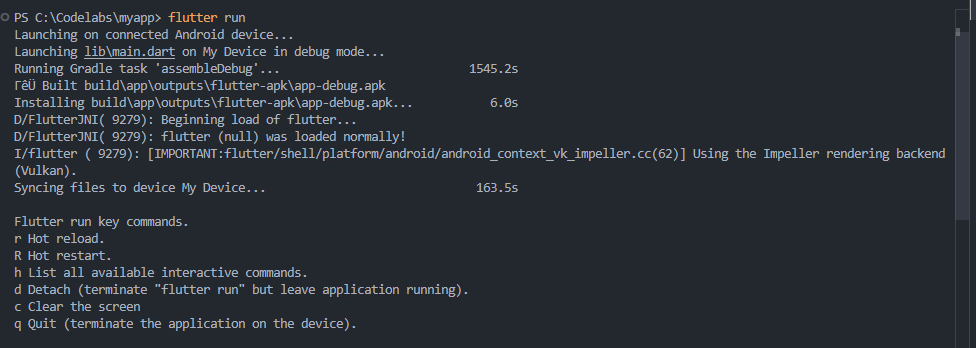
Run the Flutter app from the root directory of your project using the command below:
flutter run
Your terminal should look something like this:
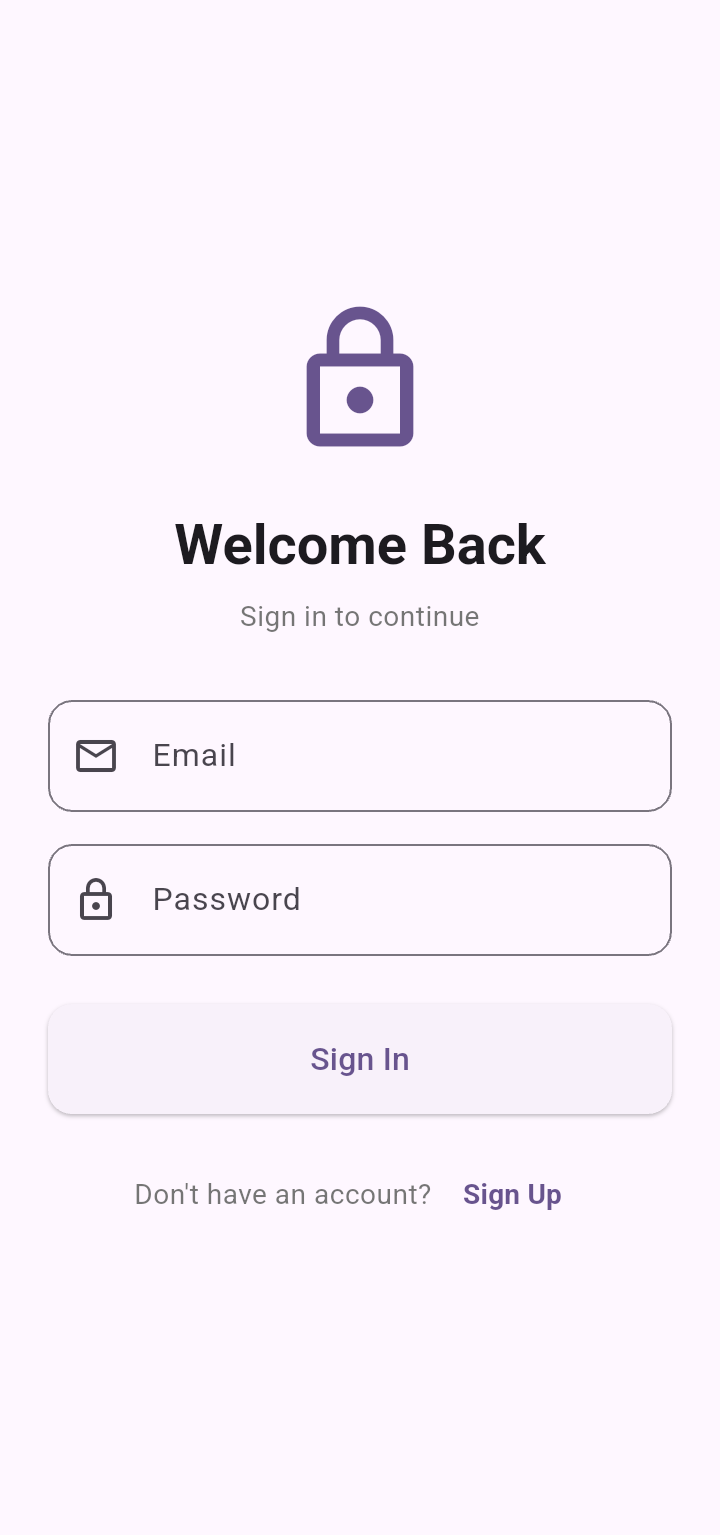
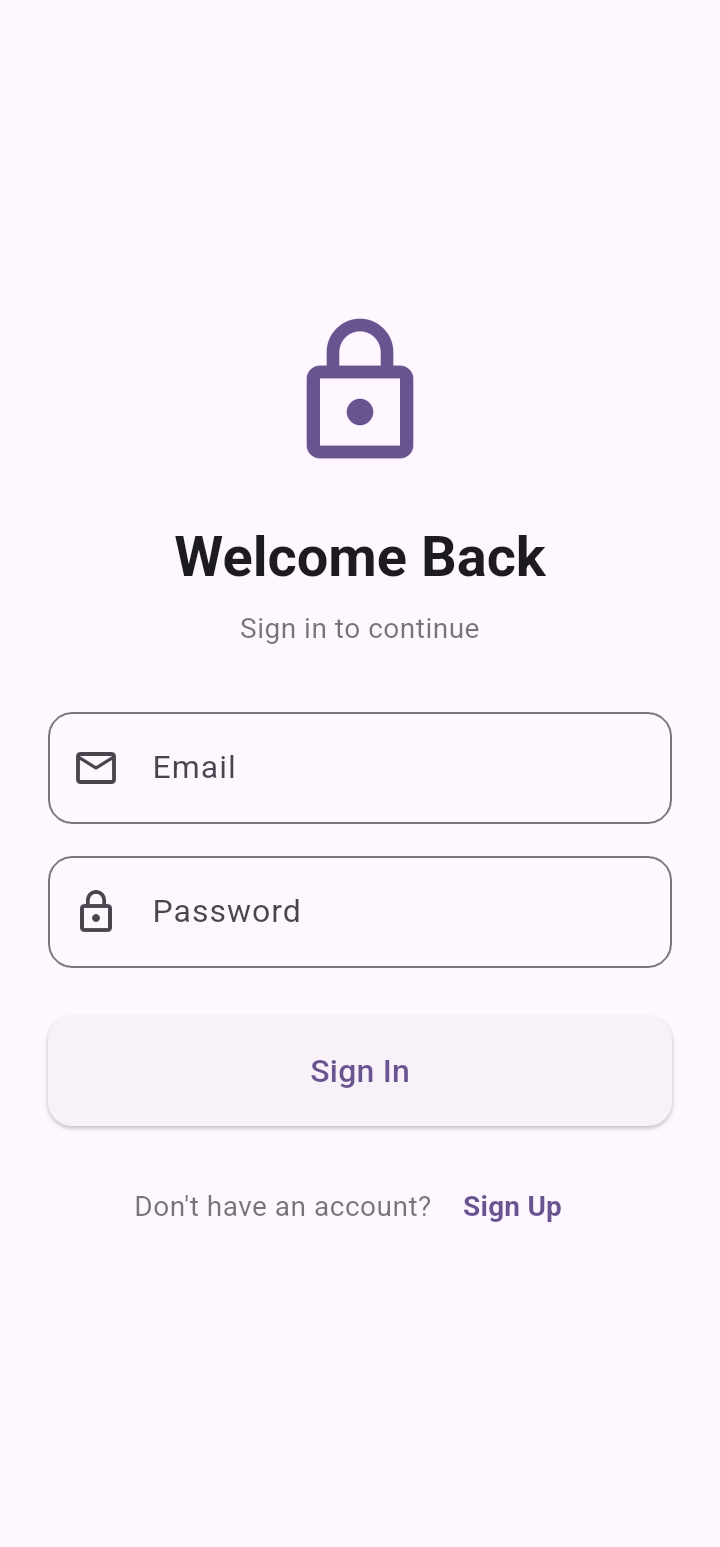
The Flutter app should launch as shown in the screenshot below:
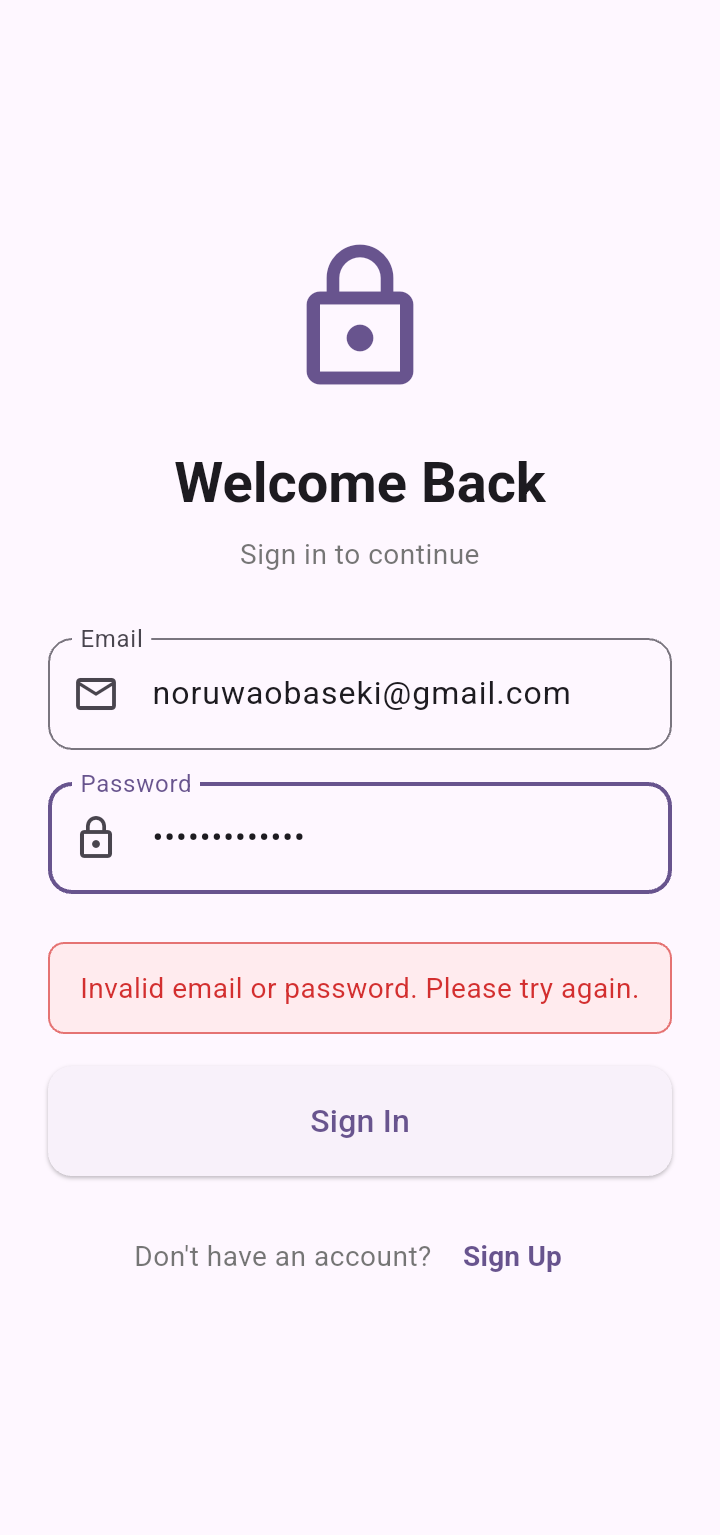
Proceed by testing the Auth0 Dart Auth SDK by inputing your details, first let's test an unregistered account and check the error message:
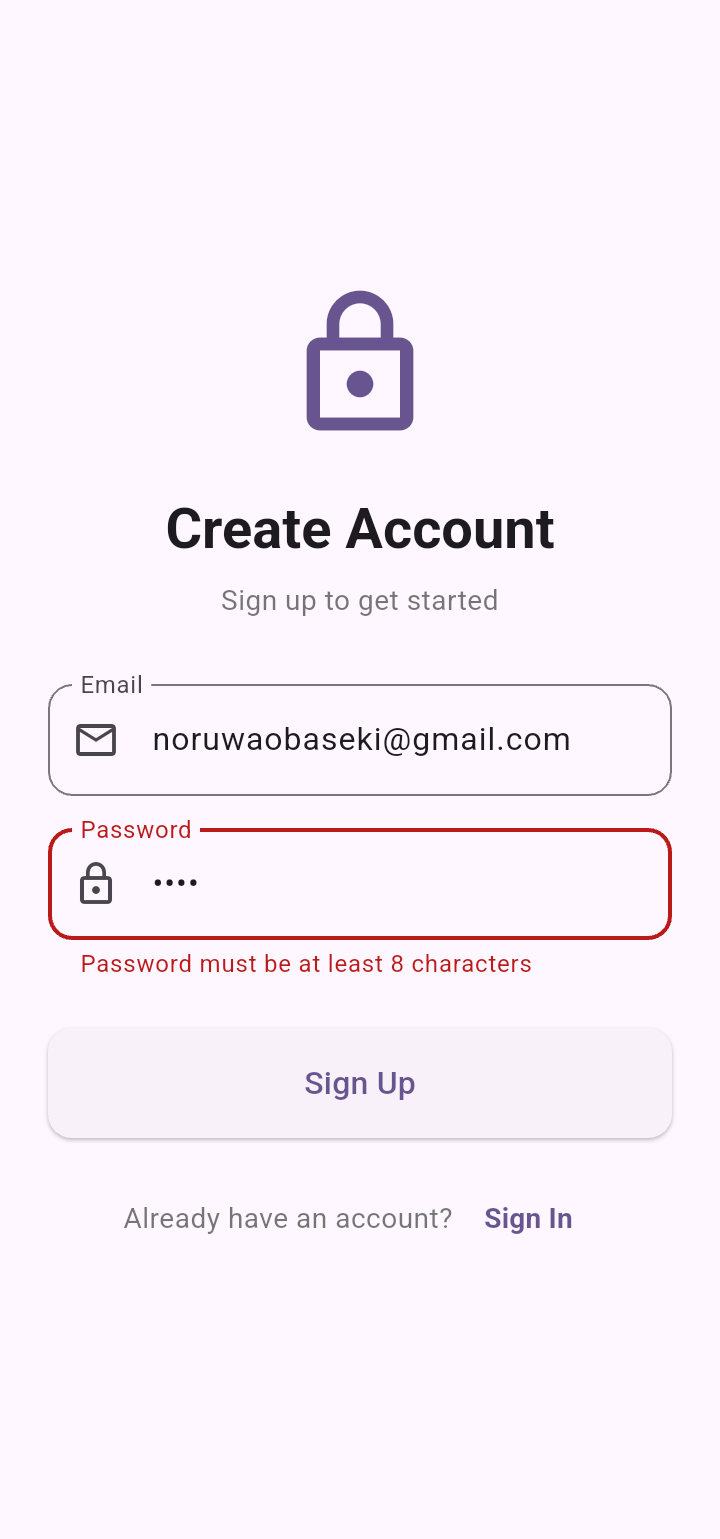
Testing with password less than 8 chartacters:
Testing with password greater than 8 characters but weak password:
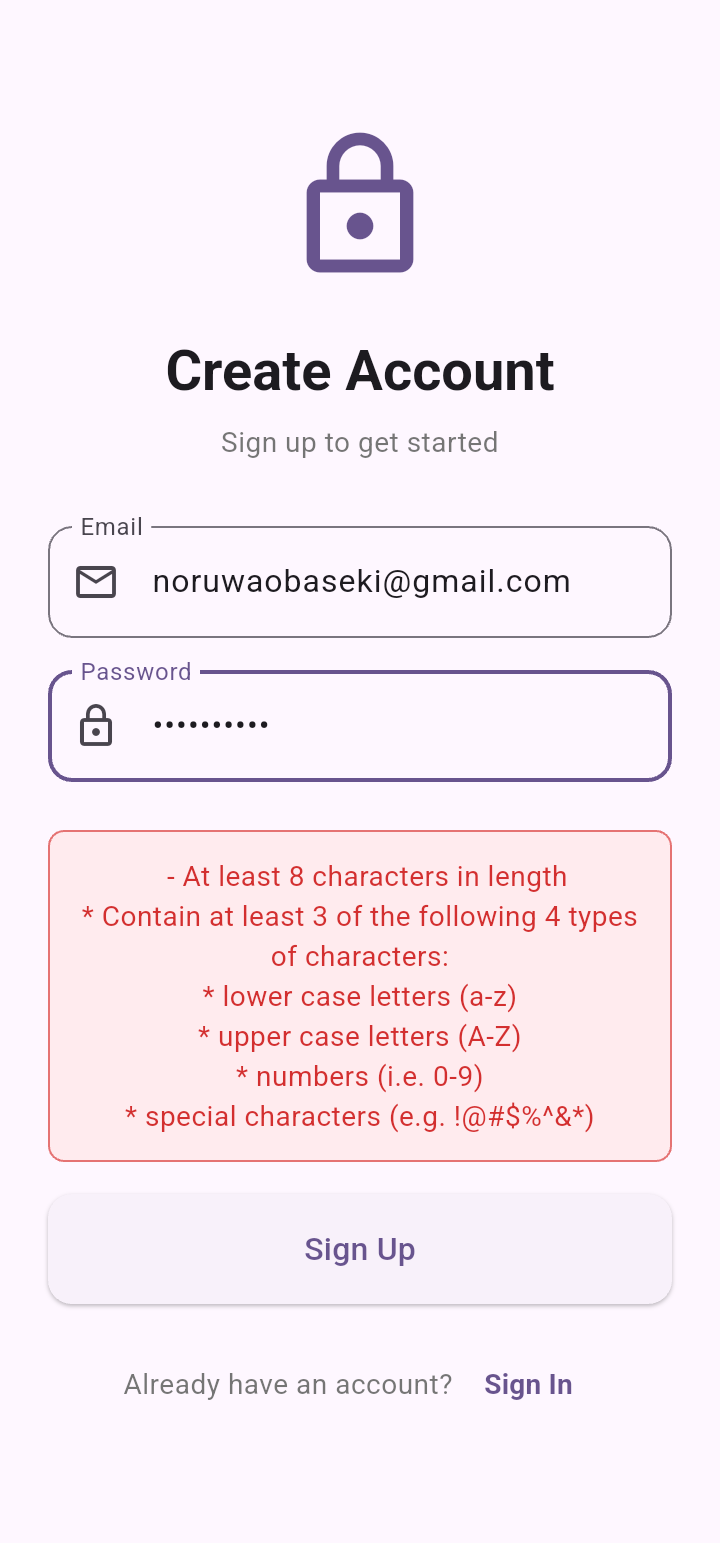
Use a strong password and a valid email address to verify account and you will be redirected to Signin screen:
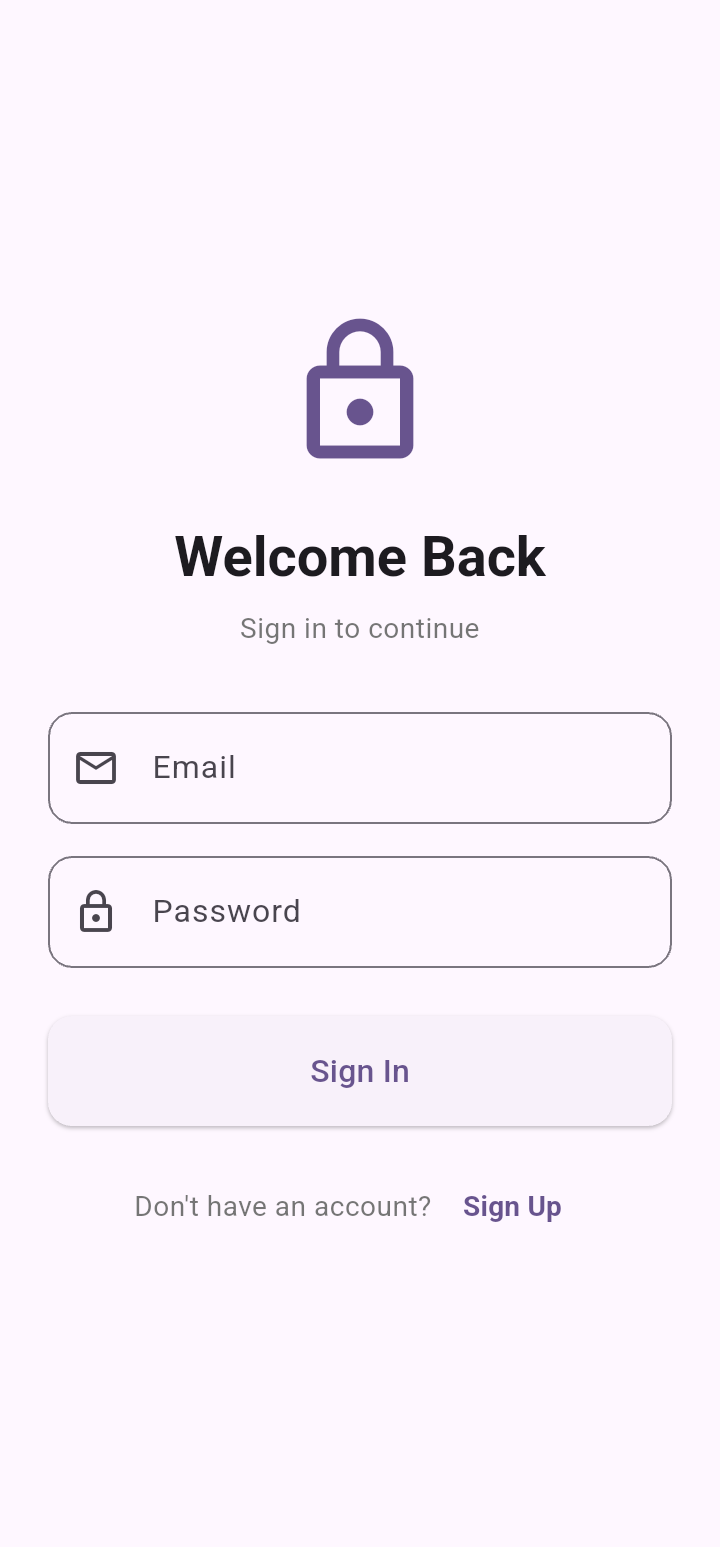
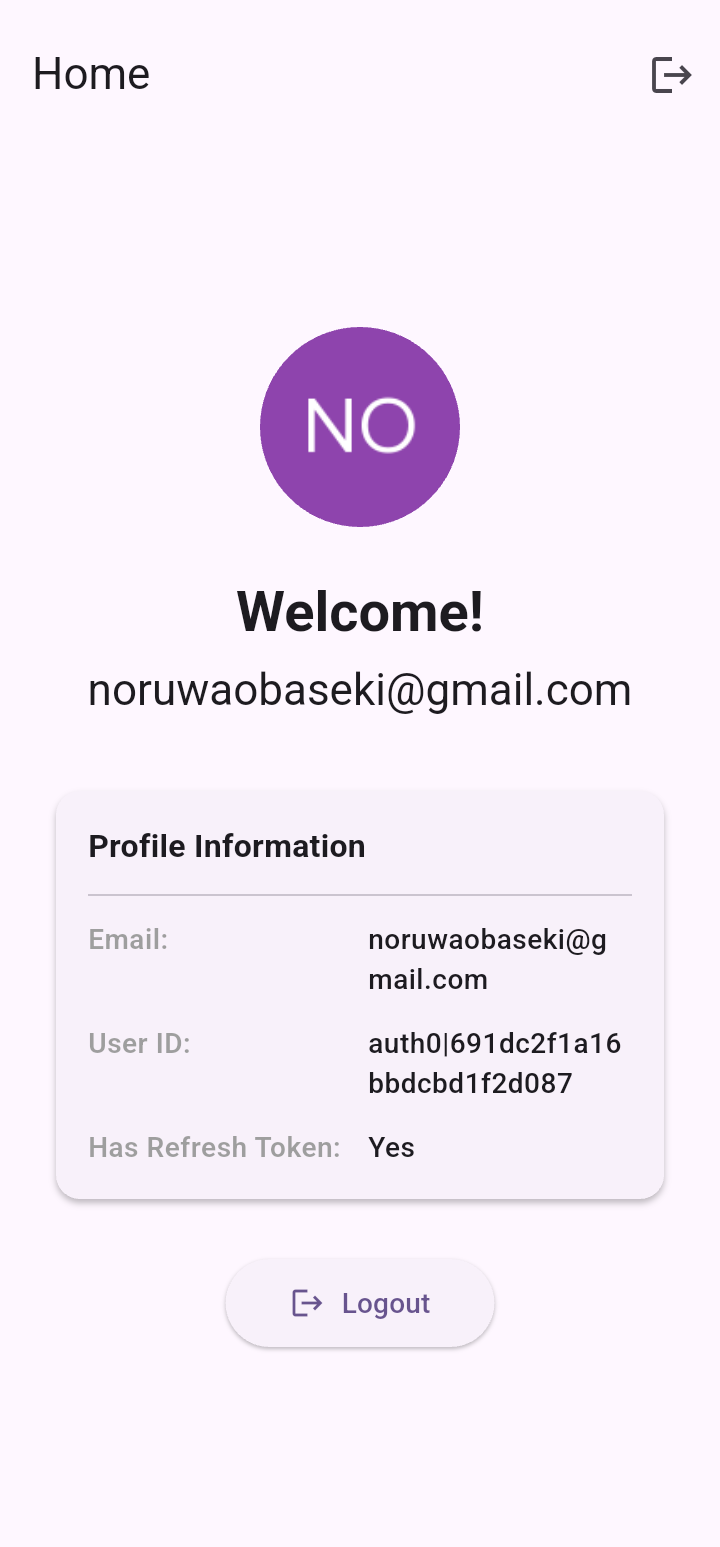
Flutter app will redirect to the Home screen after successful Signin:
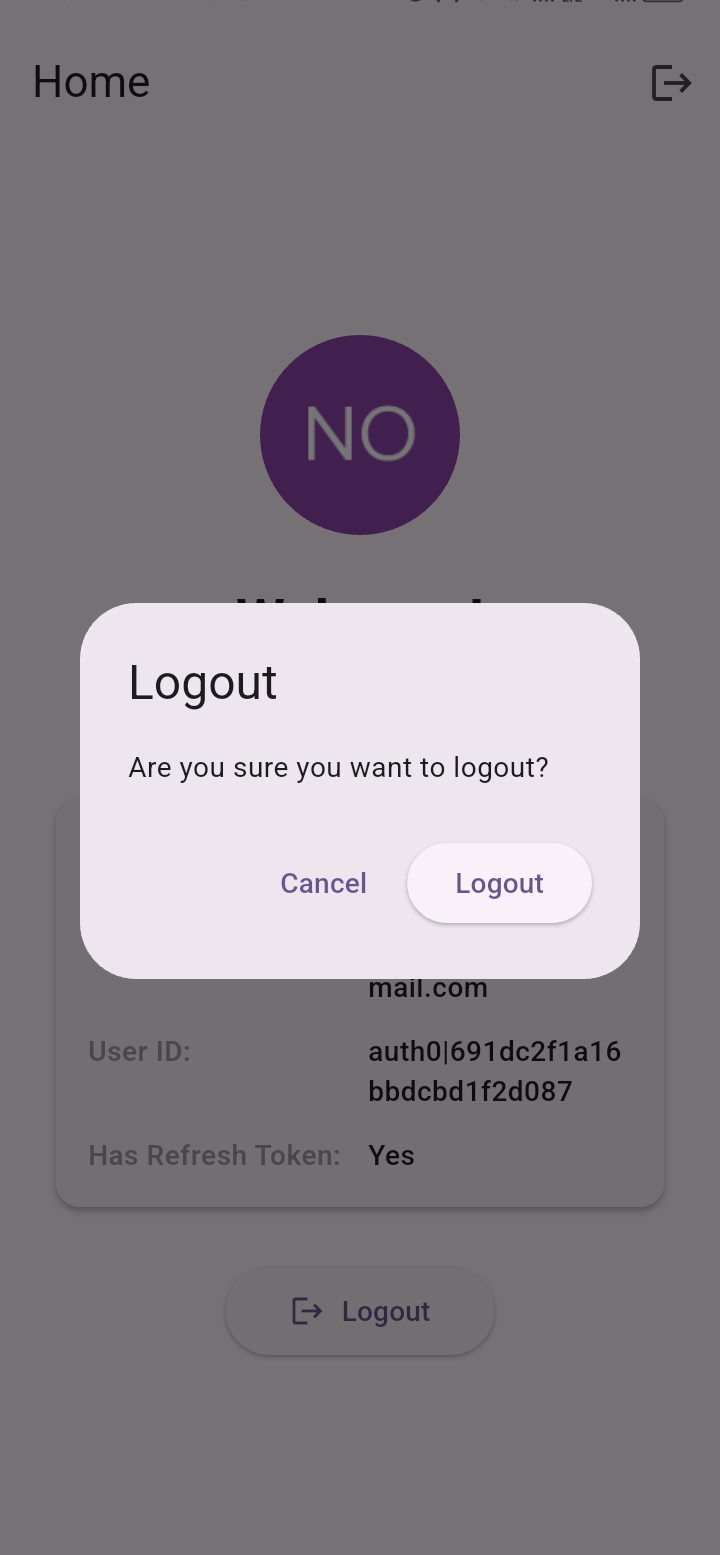
Now, you can Signout. This will open your default browser to a blank page to clear Auth0 sessions and redirect back to your Flutter App - Callback logout:
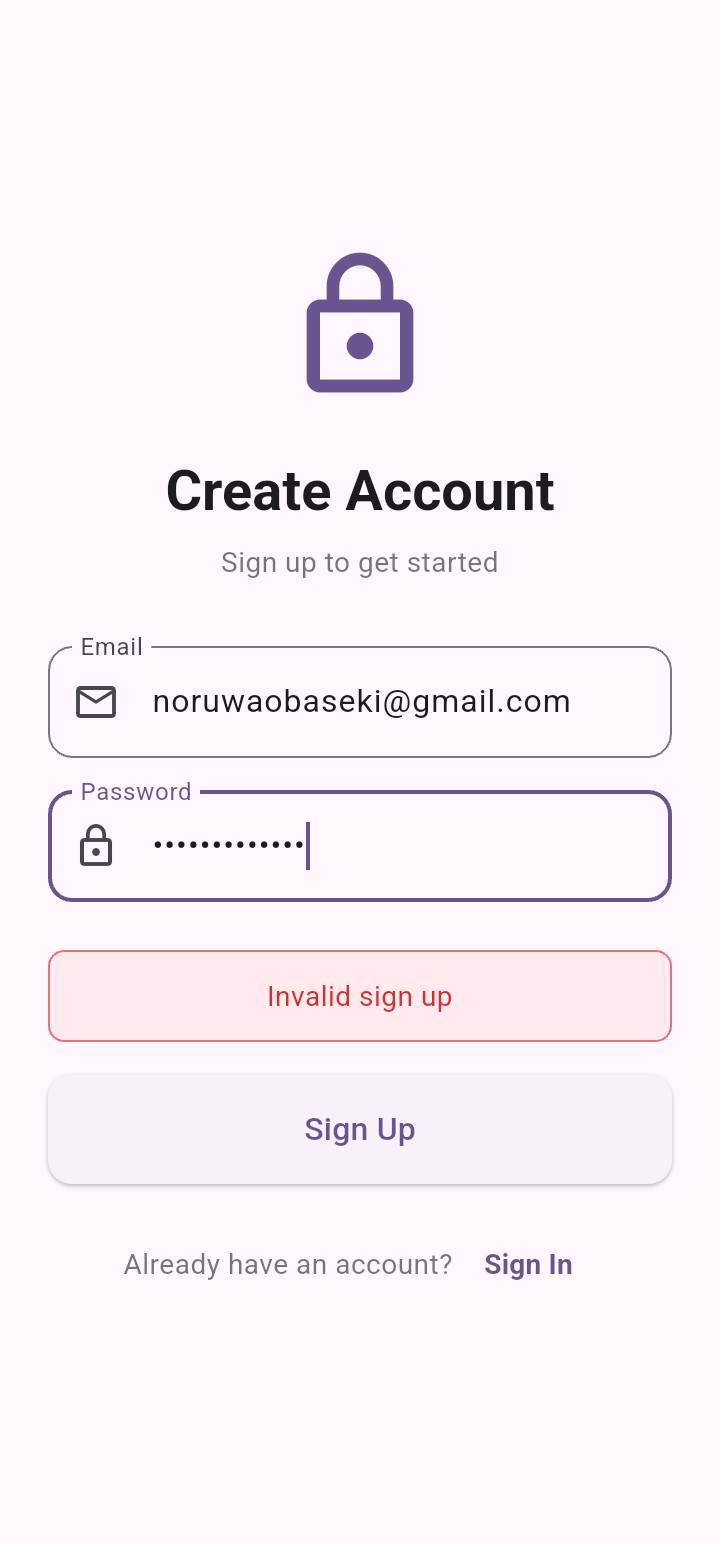
Testing Create account with registered email error:
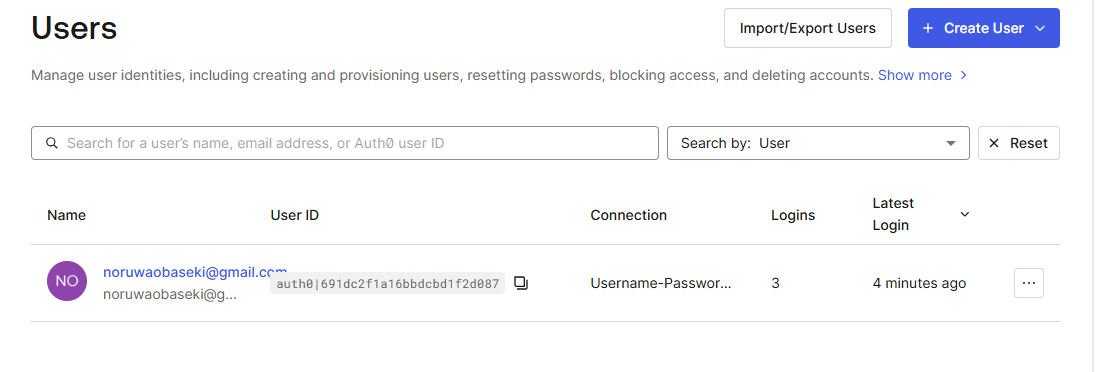
Auth0 User management database:
Conclusion
In this guide, we explored how to implement authentication in a Flutter application using Auth0 through the auth0_dart_auth_sdk. With just a few configurations and clean Dart code, you can easily integrate login and logout functionality into any Flutter project.
This approach is highly reusable, meaning the same concepts can be applied to more complex applications—from small mobile apps to full-scale production systems. By leveraging Auth0, you benefit from a secure, reliable, and fast identity solution built with industry best practices in mind.
The key advantages include enhanced security, developer productivity, and a faster time to market thanks to Auth0’s battle-tested authentication services.
